How CRM Software Helps Businesses Manage Customers and Increase Sales
CRM software helps businesses organize customer information, track sales leads, automate follow-ups, and manage customer interactions from one place. This guide explains how CRM improves sales, customer service, marketing, and customer retention while showing when a business needs a CRM solution.

Ahom Jawadur Rahman
11 Aug, 2026
CRM Software, Customer Relationship Management
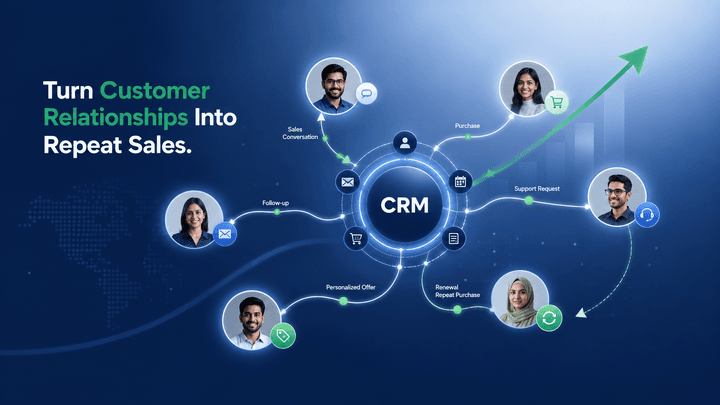
CRM software helps businesses increase customer retention and sales by keeping every customer interaction, calls, messages, orders, and complaints, organized in one place, so no follow-up or sales opportunity gets missed. Whether a business has five customers or five thousand, the same problem shows up without it: important details get forgotten, and forgotten details cost sales. This guide explains what CRM software actually does and why it matters more than most businesses realize.
What Is CRM Software, in Simple Terms?
CRM stands for Customer Relationship Management. In practice, it's software that keeps a record of every customer: what they bought, when they last got in touch, what they asked about, and what still needs to be followed up on.
Think of it as a shared memory for the whole business. Instead of one salesperson remembering a customer's preferences in their head (or losing that knowledge when they leave the company), the information is stored in a system everyone on the team can see.
Why Following Up With Customers Matters So Much
Most lost sales don't happen because a customer said no. They happen because nobody followed up. A customer asks for a price, gets busy, and without a reminder, the conversation quietly dies.
For example, if a lead requests a quote on a Tuesday and no one contacts them again until they've already bought from someone else, that's not a marketing problem. It's a follow-up problem. A customer relationship management system solves this by automatically reminding staff when a customer is due for a check-in, so opportunities don't slip through simply because someone forgot.
How CRM Helps a Business Sell More
A sales CRM gives a business a clear view of every deal in progress: who's interested, what stage they're at, and what needs to happen next. Instead of guessing which leads are worth chasing, the sales team can see exactly where each one stands.
Practical examples of this in action include:
- 1. A reminder that pops up when a quoted customer hasn't responded in a week.
- 2. A dashboard showing which leads are close to closing and which have gone quiet.
- 3. A record of past purchases that helps a salesperson suggest a relevant add-on or upgrade.
This kind of visibility is what separates a business that grows sales steadily from one that only sells to whoever happens to call in.
How CRM Improves Customer Service
When a customer calls with a problem, the fastest way to frustrate them is to make them repeat their whole history before anyone can help. A CRM prevents this by keeping a full customer history (past orders, previous complaints, earlier conversations) available the moment their name comes up.
For a business CRM software user, this means any staff member, not just the one who originally handled the customer, can pick up the conversation with full context. That alone makes customer service feel faster and more personal, even with a larger team.
How CRM Supports Better Marketing
A customer management system doesn't just store contact details. It also groups customers by what they've bought, how often they buy, or how long it's been since their last order.
This makes marketing more relevant. Instead of sending the same message to everyone, a business can send a restock reminder only to customers who bought a specific product, or a special offer only to customers who haven't ordered in a while. Marketing that's based on real customer behavior tends to get a better response than a generic blast to the entire list.
How CRM Increases Customer Retention
Retention comes down to one simple idea: customers stay with businesses that remember them. A CRM makes that possible at scale, through things like:
- 1. Automatic reminders to check in with a customer who hasn't ordered in a while.
- 2. Alerts for renewal dates, so a subscription or service doesn't lapse by accident.
- 3. A record of past issues, so a returning complaint is treated as a pattern, not a surprise.
None of this requires a business owner to personally remember every customer. The system remembers, and prompts the right action at the right time.
Common Signs a Business Needs a CRM
A few patterns tend to show up right before a business decides it needs one:
- 1. Sales leads are tracked in a spreadsheet, and some quietly get forgotten.
- 2. Different staff members have different (and sometimes outdated) information about the same customer.
- 3. Following up with customers depends on one person remembering to do it.
- 4. There's no easy way to see which customers haven't ordered in a while.
If two or more of these sound familiar, it's usually a sign that customer relationships have outgrown spreadsheets and memory alone.
Choosing a CRM Solution That Fits Your Business
Once a business recognizes these patterns, the next step is choosing a system that matches how it actually works, rather than a generic tool with features it will never use. KanBird CRM, built by IT Lab Solutions, is one example of a CRM designed around this exact set of problems: tracking sales leads, storing customer history, and managing service requests in one place.
The right CRM isn't the one with the most features. It's the one that makes sure every customer conversation gets followed up on, every complaint gets tracked, and every sale that could have happened, actually does.
Frequently Asked Questions (FAQ)
1. What is CRM software used for?
CRM software helps businesses manage customer information, track sales leads, organize follow-ups, and improve customer communication from one central system.
2. How does CRM software increase sales?
CRM software increases sales by helping businesses track leads, schedule follow-ups, understand customer needs, and prevent potential sales opportunities from being missed.
3. Can small businesses benefit from using CRM software?
Yes. Small businesses can use CRM software to organize customer data, improve follow-up processes, and build stronger relationships without relying on spreadsheets or manual tracking.
4. How does CRM software improve customer retention?
CRM software improves customer retention by storing customer history, tracking previous interactions, and reminding businesses when to follow up or reconnect with customers.
5. Why is CRM better than using spreadsheets for customer management?
CRM software provides automated reminders, sales tracking, customer history, and team access, while spreadsheets often become difficult to manage as customer numbers and business operations grow.